Action Reference
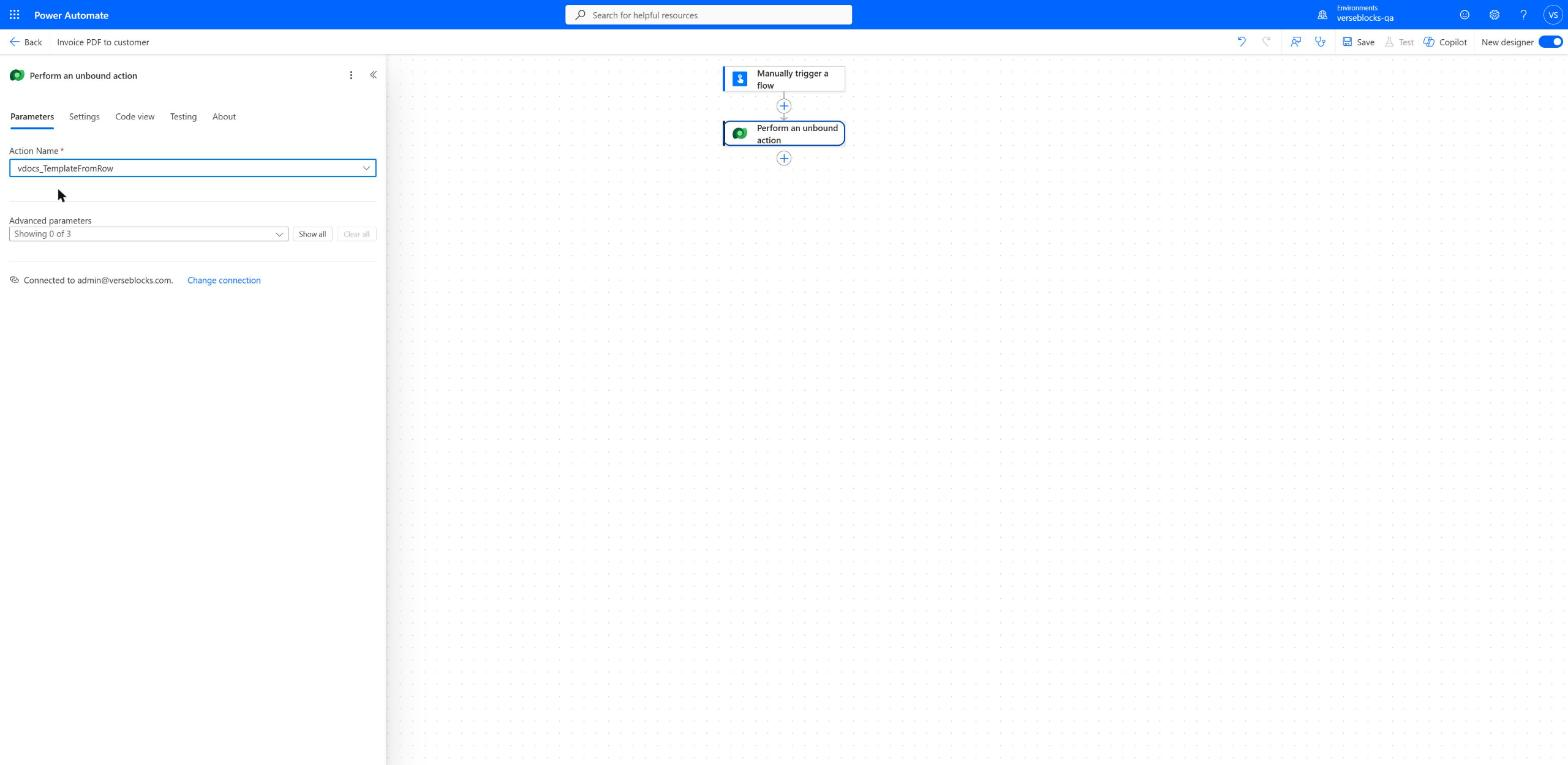
All 69 VerseDocs actions. Each is a Dataverse Custom API you call with the Dataverse connector’s Perform an unbound action step, or from anything else that can reach Dataverse.
Templating
Fill a Word, Excel or PowerPoint template with data.
vdocs_TemplateDocxPopulate a Word Template with Data
The flagship templating action: fills a Word (.docx) template's {{field}} tokens, {{#each}} table loops, and {{#if}} conditionals from your JSON data, and can embed images by name. Optionally converts the result straight to PDF in the same call.
Request
DataString- JSON object providing the values for every {{field}} token in the template, e.g. {"customer":{"name":"Jane Doe"},"lines":[{"item":"Widget","qty":2}]}.
FileContentString- The .docx template file, Base64-encoded.
FileNameString- The Word template's file name.
OptionsString- JSON: {"culture":null (formatter culture, e.g. "en-GB"),"onMissing":"error" (or "blank"),"images":{"logo":"<base64>"} (map for {{image:logo}} tokens),"outputFormat":null (set "pdf" to convert),"pdfConformance":null ("PDF/A-1b"/"-2b"/"-3b" for archival PDF; needs a license)}.
Response
MetaString- JSON: {durationMs, edition, engine (present only when converted to PDF)}.
OutContentTypeString- The MIME type of the output (Word or PDF, matching the file produced).
OutFileContentString- The rendered document, Base64-encoded.
OutFileNameString- Suggested file name for the rendered document (.docx, or .pdf if Options.outputFormat was "pdf").
vdocs_TemplateXlsxPopulate an Excel Template with Data
Fills an Excel (.xlsx) template's {{field}} tokens and duplicates a marked "rows" region once per item in your data, for producing multi-row reports from a template's layout and formatting.
Request
DataString- JSON object providing the values for every {{field}} token and row-region loop in the template.
FileContentString- The .xlsx template file, Base64-encoded.
FileNameString- The Excel template's file name.
OptionsString- JSON object: {"culture":null,"onMissing":"error" (or "blank"),"outputFormat":null (set to "pdf" to convert to PDF),"pdfConformance":null (with outputFormat "pdf": "PDF/A-1b", "PDF/A-2b" or "PDF/A-3b" for an archival PDF; requires a licensed environment)}.
Response
MetaString- JSON object: {"durationMs":...,"edition":...,"engine":"..." (present only when converted to PDF)}.
OutContentTypeString- The MIME type of the output.
OutFileContentString- The rendered workbook, Base64-encoded.
OutFileNameString- Suggested file name for the rendered workbook (.xlsx, or .pdf if converted).
vdocs_TemplatePptxPopulate a PowerPoint Template with Data
Fills a PowerPoint (.pptx) template's {{field}} tokens, {{#each}} loops and {{#if}} conditionals from your JSON data, across slides and tables. A block whose tags sit on different slides repeats that whole run of slides once per item -- one slide per product, per region, per site.
Request
DataString- JSON object providing the values for every {{field}} token in the template.
FileContentString- The .pptx template file, Base64-encoded.
FileNameString- The PowerPoint template's file name.
OptionsString- JSON object: {"culture":null,"onMissing":"error" (or "blank"),"outputFormat":null (set to "pdf" to convert to PDF),"pdfConformance":null (with outputFormat "pdf": "PDF/A-1b", "PDF/A-2b" or "PDF/A-3b" for an archival PDF; requires a licensed environment)}.
Response
MetaString- JSON object: {"durationMs":...,"edition":...,"engine":"..." (present only when converted to PDF)}.
OutContentTypeString- The MIME type of the output.
OutFileContentString- The rendered presentation, Base64-encoded.
OutFileNameString- Suggested file name for the rendered presentation (.pptx, or .pdf if converted).
vdocs_TemplateFromRowGenerate a Document from a Dataverse Row
Renders a governed VerseDocs template (a vdocs_template row you've set up in Template Studio) against a specific Dataverse record -- pulling the record's own field values and any related data the template's binding query needs -- with no file handling required in your flow.
Request
OptionsString- JSON: {"culture":null,"onMissing":"error" (or "blank"),"outputFormat":null (set "pdf" to convert),"pdfConformance":null ("PDF/A-1b"/"-2b"/"-3b"; needs a license),"fetchXml":null (overrides the template's related-data query),"includeProvenance":true}.
RowIdString- The GUID of the Dataverse row to render the template against (e.g. an Account or Opportunity record id).
TemplateIdString- The GUID of the vdocs_template row to render.
Response
MetaString- JSON: {durationMs, edition, engine (present only when converted to PDF)}.
OutContentTypeString- The MIME type of the output.
OutFileContentString- The generated document, Base64-encoded.
OutFileNameString- Suggested file name for the generated document.
vdocs_TemplateBatchGenerate Documents for Multiple Rows at Once
Renders one document per Dataverse row for a batch of records in a single call -- e.g. a letter for every contact in a list -- bundling the results into a zip (or merging them into one combined PDF). Capped and time-budgeted; see docs/API.md for the current limit.
Request
OptionsString- JSON: {"culture":null,"onMissing":"error","fetchXml":null (resolves target rows, alternative to RowIds),"includeProvenance":true,"batchOutput":"zip" (or "pdf" to merge into one file),"fileNameField":null,"pdfConformance":null ("PDF/A-1b"/"-2b"/"-3b"; needs a license)}.
RowIdsString- JSON array of Dataverse row GUIDs to render, e.g. ["...","..."]. Takes priority over Options.fetchXml when both are supplied.
TemplateIdString- The GUID of the vdocs_template row to render.
Response
MetaString- JSON: {rowCount (rows rendered), durationMs, edition}.
OutContentTypeString- The MIME type of the output.
OutFileContentString- The batch result, Base64-encoded.
OutFileNameString- Suggested file name for the batch result (a zip, or one merged PDF per Options.batchOutput).
vdocs_GenerateAndAttachGenerate a Document and Attach It to a Record
One-click document generation: renders a template against a Dataverse row (same as Generate a Document from a Dataverse Row) and attaches the result directly to that row's timeline as a note, so it shows up in the record's UI immediately -- no separate "create attachment" step needed in your flow.
Request
OptionsString- JSON: {"culture":null,"onMissing":"error","outputFormat":null,"pdfConformance":null ("PDF/A-1b"/"-2b"/"-3b"; needs a license),"fetchXml":null,"includeProvenance":true,"attach":true (false = render/return only),"noteSubject":null,"noteText":null ({{field}} tokens ok)}.
RowIdString- The GUID of the Dataverse row to render against and attach the result to.
TemplateIdString- The GUID of the vdocs_template row to render.
Response
AnnotationIdString- GUID of the note created on the record, or empty if Options.attach was set to false.
MetaString- JSON object with call diagnostics, e.g. {"durationMs":...,"edition":...}.
OutContentTypeString- The MIME type of the output.
OutFileContentString- The generated document, Base64-encoded.
OutFileNameString- Suggested file name for the generated document.
vdocs_TemplateScaffoldGenerate a Starter Template
Generates a ready-to-edit Word template with real {{field}} tokens for a table already in place, so you can start from a working file instead of a blank one. Pick a shape (blank, letter, invoice, quote); tokens use that table's actual columns, resolved live.
Request
OptionsString- JSON object: {"style":"blank"|"letter"|"invoice"|"quote", required,"boundTable":"account", required -- the table's logical name to pull real field tokens from,"title":null -- optional title line override, each style has a sensible default}.
Response
MetaString- JSON object: {"durationMs":...,"edition":...,"style":..,"boundTable":..,"fieldCount":7}.
OutContentTypeString- The MIME type of the output (Word).
OutFileContentString- The generated .docx template, Base64-encoded.
OutFileNameString- Suggested file name for the generated starter template, e.g. "invoice_template.docx".
vdocs_ValidateTemplateTokensCheck a Template's Fields Against Your Data Source
Scans every {{field}} token in a Word/Excel/PowerPoint template and checks each one against a list of field names you know are valid, flagging unknown tokens with a "did you mean...?" suggestion. Used by Template Studio to catch typos before a template goes live.
Request
FileContentString- The template file (.docx, .xlsx, or .pptx), Base64-encoded.
FileNameString- The template's file name.
OptionsString- JSON object: {"templateType":"docx"|"xlsx"|"pptx", required,"knownFields":["customer.name","total",...], required -- the list of field names this template is allowed to reference}.
Response
MetaString- JSON object with call diagnostics, e.g. {"durationMs":...,"edition":...}.
ResultString- JSON validation report: token/field counts plus a per-field known/unknown check with suggestions.
Split, merge, secure, fill and inspect PDF files.
vdocs_PdfMergeMerge PDFs into One File
Combines two or more PDF files into a single PDF, in the order given.
Request
FilesString- JSON array of PDF files to merge, in order: [{"name":"a.pdf","content":"<base64>"}, ...]. At least 2 files.
Response
MetaString- JSON object: {"pages":<total page count>,"durationMs":...,"edition":...}.
OutContentTypeString- The MIME type of the output (application/pdf).
OutFileContentString- The merged PDF, Base64-encoded.
OutFileNameString- Suggested file name for the merged PDF ("merged.pdf").
vdocs_PdfSplitSplit a PDF into Multiple Files
Splits one PDF into several smaller PDFs, either by explicit page ranges you specify or by a fixed number of pages per chunk.
Request
FileContentString- The PDF file, Base64-encoded.
FileNameString- The PDF's file name.
OptionsString- JSON object: {"ranges":"1-3,7", "everyN":null}. Set exactly one: ranges is a comma-separated list of page ranges/pages, each becoming one output file; everyN splits into fixed-size chunks of that many pages instead.
Response
MetaString- JSON object with call diagnostics, e.g. {"durationMs":...,"edition":...}.
OutFilesString- JSON array of split PDFs: [{"Name","Content","ContentType"}], one entry per output file, in order.
vdocs_PdfPagesRotate, Delete, Extract, or Reorder PDF Pages
Performs one page-level edit on a PDF: rotate pages, delete pages, extract a subset of pages into a new PDF, or reorder pages -- chosen by Options.operation.
Request
FileContentString- The PDF file, Base64-encoded.
FileNameString- The PDF's file name.
OptionsString- JSON: {"operation":"rotate|delete|extract|reorder" (required),"pages":"1-3,7" (required for delete/extract; all pages if omitted for rotate),"degrees":90 (rotate only, a multiple of 90),"newOrder":"3,1,2" (reorder only: every page number once, comma-separated)}.
Response
MetaString- JSON object: {"pages":<resulting page count>,"durationMs":...,"edition":...}.
OutContentTypeString- The MIME type of the output (application/pdf).
OutFileContentString- The edited PDF, Base64-encoded.
OutFileNameString- Suggested file name for the edited PDF.
vdocs_PdfWatermarkAdd a Text or Image Watermark to a PDF
Stamps a text or image watermark onto every page of a PDF, at a chosen position (9 anchors), opacity, and rotation. Text watermarks support dynamic tokens {date}, {page}, and {pages}.
Request
FileContentString- The PDF file, Base64-encoded.
FileNameString- The PDF's file name.
OptionsString- JSON: {"text":"...", or "imageContent":"<base64>" (set one, not both),"anchor":"MiddleCenter" (9 positions),"opacity":0.3,"rotationDegrees":0,"fontSize":24,"colorHex":"#FF0000","marginPoints":24,"imageWidthPoints":null,"imageHeightPoints":null}. Text supports {date}/{page}/{pages}.
Response
MetaString- JSON object: {"pages":...,"durationMs":...,"edition":...}.
OutContentTypeString- The MIME type of the output (application/pdf).
OutFileContentString- The watermarked PDF, Base64-encoded.
OutFileNameString- Suggested file name for the watermarked PDF.
vdocs_PdfSecurePassword-Protect a PDF
Encrypts a PDF with AES-256, requiring an owner password (to change permissions) and optionally a separate password just to open the file, plus fine-grained permission flags (printing, editing, copying text, etc.).
Request
FileContentString- The PDF file, Base64-encoded.
FileNameString- The PDF's file name.
OptionsString- JSON: {"ownerPassword":"..." (required),"userPassword":null (also required to open the file if set),"permitPrint":true,"permitModifyDocument":false,"permitExtractContent":false,"permitAnnotations":true,"permitFormsFill":true,"permitAssembleDocument":false,"permitFullQualityPrint":true}.
Response
MetaString- JSON object with call diagnostics, e.g. {"durationMs":...,"edition":...}.
OutContentTypeString- The MIME type of the output (application/pdf).
OutFileContentString- The password-protected PDF, Base64-encoded.
OutFileNameString- Suggested file name for the protected PDF.
vdocs_PdfUnlockRemove a PDF's Password Protection
Removes password protection from a PDF, given a password that opens it. The output is a normal, unprotected PDF.
Request
FileContentString- The password-protected PDF file, Base64-encoded.
FileNameString- The protected PDF's file name.
OptionsString- JSON object: {"password":"...", required -- the password that opens this file}.
Response
MetaString- JSON object with call diagnostics, e.g. {"durationMs":...,"edition":...}.
OutContentTypeString- The MIME type of the output (application/pdf).
OutFileContentString- The unprotected PDF, Base64-encoded.
OutFileNameString- Suggested file name for the unlocked PDF.
vdocs_PdfFormFillFill In a PDF Form
Fills a fillable PDF (AcroForm) by field name: text box values and checkbox on/off states. Field names must match the PDF's own internal form field names exactly (use PdfFormExtract to discover them).
Request
FileContentString- The fillable PDF file, Base64-encoded.
FileNameString- The fillable PDF's file name.
OptionsString- JSON object: {"textFields":{"FieldName":"value", ...},"checkboxFields":{"FieldName":true, ...}}. Both maps are optional; omit a map entirely to leave those field types unchanged.
Response
MetaString- JSON object with call diagnostics, e.g. {"durationMs":...,"edition":...}.
OutContentTypeString- The MIME type of the output (application/pdf).
OutFileContentString- The filled PDF, Base64-encoded.
OutFileNameString- Suggested file name for the filled PDF.
vdocs_PdfFormExtractRead a PDF Form's Current Field Values
Reads every fillable field's current value out of a PDF form (AcroForm) -- both its internal field name and current value -- without modifying the file. Use this to discover field names before calling PdfFormFill, or to read back submitted form data.
Request
FileContentString- The fillable PDF file, Base64-encoded.
FileNameString- The fillable PDF's file name.
Response
MetaString- JSON object with call diagnostics, e.g. {"durationMs":...,"edition":...}.
ResultString- JSON: {"textFields":{name:value},"checkboxFields":{name:true/false}} -- every field's current value.
vdocs_PdfFlattenLock a PDF Form's Fields (Flatten)
Marks every field in a fillable PDF as read-only, so it can no longer be edited in a PDF viewer, while keeping the filled-in values visible. Note: this locks the fields but does not permanently rasterize/bake the values into the page (see docs/API.md for the precise behavior).
Request
FileContentString- The fillable PDF file, Base64-encoded.
FileNameString- The fillable PDF's file name.
Response
MetaString- JSON object: {"pages":...,"durationMs":...,"edition":...}.
OutContentTypeString- The MIME type of the output (application/pdf).
OutFileContentString- The PDF with all form fields locked read-only, Base64-encoded.
OutFileNameString- Suggested file name for the locked PDF.
vdocs_PdfMetadataGet or Set a PDF's Document Properties
Reads a PDF's title/author/subject/keywords/creation date (Options.mode = "get", the default), or sets new values for title/author/subject/keywords (Options.mode = "set", leaving any field you don't specify unchanged).
Request
FileContentString- The PDF file, Base64-encoded.
FileNameString- The PDF's file name.
OptionsString- JSON object: {"mode":"get"|"set" (default "get"),"title":null,"author":null,"subject":null,"keywords":null}. title/author/subject/keywords only apply in "set" mode; leave a field null in "set" mode to leave it unchanged.
Response
MetaString- JSON object: {"mode":"get"|"set","durationMs":...,"edition":...}.
OutContentTypeString- Populated only when Options.mode is "set": the MIME type of the output (application/pdf).
OutFileContentString- Populated only when Options.mode is "set": the updated PDF, Base64-encoded.
OutFileNameString- Populated only when Options.mode is "set": suggested file name for the updated PDF.
ResultString- Get mode only: JSON {title,author,subject,keywords,creator,creationDate,modificationDate,pageCount}.
vdocs_ExtractTextExtract Text from a PDF
Pulls the plain text out of a PDF, both as one page-by-page list and as a single combined string. Use this to search, index, or summarize a PDF's content without opening it.
Request
FileContentString- The PDF file, Base64-encoded.
FileNameString- The PDF's file name.
OptionsString- JSON object: {"password":null}. Set password if the PDF is password-protected.
Response
MetaString- JSON object with call diagnostics, e.g. {"durationMs":...,"edition":...}.
ResultString- JSON: {"pagesText":["page 1 text",...],"fullText":"all pages joined"}.
vdocs_PdfPageInfoPremiumGet a PDF's Page Dimensions
Reads a PDF and returns every page's size (in points) and rotation, without modifying the file. Use this to check page size/orientation before running another PDF action, or to detect mixed page sizes in a scanned document.
Request
FileContentString- The PDF file, Base64-encoded.
FileNameString- The PDF's file name.
OptionsString- JSON object: {"password":null}. Set password if the PDF is password-protected.
Response
MetaString- JSON object with call diagnostics, e.g. {"durationMs":6,"edition":"Standard"}.
ResultString- JSON: {pages:[{pageNumber,widthPt,heightPt,rotation}]}. Sizes in points (72 per inch).
vdocs_PdfExtractImagesPremiumExtract Images from a PDF
Pulls every embedded image out of a PDF and returns them as separate image files. Use this to recover photos, logos, or scanned pages embedded in a PDF without a full re-render.
Request
FileContentString- The PDF file, Base64-encoded.
FileNameString- The PDF's file name.
OptionsString- JSON object: {"password":null}. Set password if the PDF is password-protected.
Response
MetaString- JSON object: {"count":4,"durationMs":25,"edition":"Standard"}.
OutFilesString- JSON array of extracted images: [{"Name","Content","ContentType"}]. Empty if none embedded.
vdocs_PdfSignPremiumDigitally Sign a PDF
Applies a cryptographic digital signature to a PDF using a certificate you supply, inside your own environment -- the private key never leaves your tenant. The signature proves the document has not changed since signing and who signed it.
Request
DataString- JSON: {"pfx":"<base64 of a .pfx/.p12 file including its private key>","password":"..."}. Fetch these from Key Vault at run time rather than storing them.
FileContentString- The PDF file, Base64-encoded.
FileNameString- The PDF's file name.
OptionsString- JSON: {"reason":null (e.g. "Approved by finance"),"location":null,"contactInfo":null,"fieldName":null (defaults to "VerseDocsSignature"; must be unique per document)}.
Response
MetaString- JSON object with call diagnostics, e.g. {"durationMs":...,"edition":...,"fieldName":...}.
OutContentTypeString- The MIME type of the output (application/pdf).
OutFileContentString- The signed PDF, Base64-encoded.
OutFileNameString- Suggested file name for the signed PDF.
Conversion
Turn one document format into another.
vdocs_ConvertToPdfConvert a Document to PDF
Converts a Word document to PDF in one action, with zero setup -- no OneDrive/SharePoint round trip needed. Tries a full-fidelity engine first and automatically falls back to a second engine if needed; Meta.engine reports which one actually produced the file.
Request
FileContentString- The document file, Base64-encoded.
FileNameString- The document's file name, e.g. "contract.docx".
Response
MetaString- JSON: {pages, durationMs, edition, engine} -- engine names which conversion rung produced this PDF.
OutContentTypeString- The MIME type of the output (application/pdf).
OutFileContentString- The converted PDF, Base64-encoded.
OutFileNameString- Suggested file name for the PDF.
vdocs_HtmlToDocxConvert HTML to a Word Document
Converts HTML to a real .docx Word file -- built for the browser-based template editor: produces the template file vdocs_TemplateDocx can populate. Inline logo images as data: URIs embed into the .docx. The HTML is sanitized before conversion.
Request
FileContentString- The HTML, Base64-encoded.
FileNameString- The source file's name, e.g. "invoice-template.html" (used to name the output .docx).
Response
MetaString- JSON object: {"durationMs":120,"edition":"Standard","engine":"Syncfusion"}.
OutContentTypeString- The MIME type of the output (Word .docx).
OutFileContentString- The generated .docx, Base64-encoded.
OutFileNameString- Suggested file name for the .docx.
vdocs_MarkdownToPdfConvert Markdown to PDF
Converts Markdown-formatted text directly to a PDF -- one action, no intermediate Word document needed. Internally renders the Markdown to HTML and runs it through the same conversion ladder as vdocs_ConvertToPdf; Meta.engine reports which engine produced it.
Request
FileContentString- The Markdown text, Base64-encoded.
FileNameString- The source file name, e.g. "notes.md" (used only to derive the output PDF's suggested name).
OptionsString- JSON object: {"useAdvancedExtensions":true}. Advanced extensions add tables, footnotes, and other common Markdown extras.
Response
MetaString- JSON object: {"pages":1,"durationMs":200,"edition":"Standard","engine":"Syncfusion"}.
OutContentTypeString- The MIME type of the output (application/pdf).
OutFileContentString- The generated PDF, Base64-encoded.
OutFileNameString- Suggested file name for the PDF.
vdocs_EmailToPdfConvert an Email (.eml) to PDF
Converts a raw .eml email message directly to a PDF you can attach or archive -- one action, no OneDrive/SharePoint round trip. Internally renders the message to HTML and runs it through the same conversion ladder as vdocs_ConvertToPdf; Meta.engine reports which engine produced it.
Request
FileContentString- The .eml file, Base64-encoded.
FileNameString- The message's file name, e.g. "message.eml".
Response
MetaString- JSON: {pages, durationMs, edition, engine} -- engine names the rung that produced this PDF.
OutContentTypeString- The MIME type of the output (application/pdf).
OutFileContentString- The generated PDF, Base64-encoded.
OutFileNameString- Suggested file name for the PDF.
Word documents
Edit an existing .docx without a template.
vdocs_DocxFindReplacePremiumFind and Replace Text in a Word Document
Finds every occurrence of a search string (or regular expression) inside a Word (.docx) document's text and replaces it, correctly handling text Word has split across multiple internal formatting runs. For mail-merge-style edits outside the templating engine.
Request
FileContentString- The .docx file, Base64-encoded.
FileNameString- The document's file name, e.g. "contract.docx".
OptionsString- JSON object: {"find":"text or pattern, required","replace":"replacement text, required","useRegex":false,"ignoreCase":false,"matchWholeWord":false,"timeoutMs":1000}. Every match is replaced (there is no "first match only" mode).
Response
MetaString- JSON object: {"replacementCount":3,"durationMs":40,"edition":"Standard"}.
OutContentTypeString- The MIME type of the output document.
OutFileContentString- The updated .docx file, Base64-encoded.
OutFileNameString- Suggested file name for the updated document.
vdocs_DocxRedactPatternPremiumRedact Text Matching a Pattern in a Word Document
Permanently removes every occurrence of a search string or regex pattern from a Word (.docx) document's text -- e.g. every account number -- replacing it with a redaction character. The original text is genuinely deleted, not just visually covered.
Request
FileContentString- The .docx file, Base64-encoded.
FileNameString- The document's file name.
OptionsString- JSON object: {"pattern":".NET regex, required","ignoreCase":false,"redactChar":"█" (the single character each redacted character is replaced with),"timeoutMs":1000}.
Response
MetaString- JSON object: {"redactionCount":2,"durationMs":40,"edition":"Standard"}.
OutContentTypeString- The MIME type of the output document.
OutFileContentString- The redacted .docx file, Base64-encoded.
OutFileNameString- Suggested file name for the redacted document.
vdocs_DocxMergePremiumMerge Multiple Word Documents into One
Combines two or more Word (.docx) documents into one, in order, optionally starting each on a new page. Note: style-id collisions, headers/footers, and some list numbering may not carry over perfectly across very different source templates -- see docs/API.md.
Request
FilesString- JSON array of .docx files to merge, in order: [{"name":"cover.docx","content":"<base64>"},{"name":"body.docx","content":"<base64>"}]. At least 2 files.
OptionsString- JSON object: {"pageBreakBetween":true}. Set to false to run documents together without forcing a new page.
Response
MetaString- JSON object with call diagnostics, e.g. {"durationMs":60,"edition":"Standard"}.
OutContentTypeString- The MIME type of the output document.
OutFileContentString- The merged .docx file, Base64-encoded.
OutFileNameString- Suggested file name for the merged document ("merged.docx").
vdocs_DocxWatermarkPremiumAdd a Text Watermark to a Word Document
Stamps a diagonal text watermark (e.g. "DRAFT" or "CONFIDENTIAL") across every page of a Word (.docx) document, using Word's own native watermark markup (visible and editable the same way Word's built-in watermark feature works).
Request
FileContentString- The .docx file, Base64-encoded.
FileNameString- The document's file name.
OptionsString- JSON object: {"text":"DRAFT", required,"colorHex":"silver","fontFamily":"Calibri","widthPt":415.65,"heightPt":207.85 (the watermark shape's size in points -- text scales to fit),"rotationDegrees":-45,"semiTransparent":true}.
Response
MetaString- JSON object with call diagnostics, e.g. {"durationMs":35,"edition":"Standard"}.
OutContentTypeString- The MIME type of the output document.
OutFileContentString- The watermarked .docx file, Base64-encoded.
OutFileNameString- Suggested file name for the watermarked document.
vdocs_DocxSetPropertiesPremiumSet a Word Document's Properties (Title, Author, etc.)
Sets a Word (.docx) document's built-in document properties -- title, author, subject, keywords, and comments -- the same fields visible in Word's File > Info panel. Leave any field unset to leave that property unchanged.
Request
FileContentString- The .docx file, Base64-encoded.
FileNameString- The document's file name.
OptionsString- JSON object, all optional: {"title":null,"author":null,"subject":null,"keywords":null,"category":null,"comments":null}.
Response
MetaString- JSON object with call diagnostics, e.g. {"durationMs":15,"edition":"Standard"}.
OutContentTypeString- The MIME type of the output document.
OutFileContentString- The updated .docx file, Base64-encoded.
OutFileNameString- Suggested file name for the updated document.
vdocs_CompareTextPremiumCompare Text Between Two PDFs or Word Documents
Extracts text from two PDF or Word (.docx) files and compares them line by line, reporting whether they're identical and a line-level diff if not. Use this to spot-check a generated document against an approved version, or review redline-style changes.
Request
FilesString- JSON array of exactly 2 files to compare (PDF or .docx, either combination): [{"name":"v1.pdf","content":"<base64>"},{"name":"v2.pdf","content":"<base64>"}].
OptionsString- JSON object: {"passwordA":null,"passwordB":null}. Set these if either PDF is password-protected (ignored for .docx files).
Response
MetaString- JSON object with call diagnostics, e.g. {"durationMs":30,"edition":"Standard"}.
ResultString- JSON: {areEqual, diff:[{status:"unchanged|added|removed",text}]} -- a line-by-line comparison.
Images
Resize, crop, convert and watermark images.
vdocs_ImageResizePremiumResize an Image
Resizes an image to a target width and/or height. Choose whether the image is fit to fully inside the box (preserving aspect ratio), stretched to fill it exactly, or cropped to fill it without distortion.
Request
FileContentString- The image file, Base64-encoded (PNG, JPEG, or similar).
FileNameString- The image file's name, e.g. "photo.jpg".
OptionsString- JSON object: {"width":800,"height":null,"mode":"fit"}. mode is "fit" (preserve aspect ratio inside the box), "stretch" (exact size, may distort), or "crop" (fill the box, cropping overflow). Set only width or only height with mode "fit" to scale proportionally.
Response
MetaString- JSON: {width, height (the resized image's final dimensions), durationMs, edition}.
OutContentTypeString- The MIME type of the output image (same format as the input).
OutFileContentString- The resized image, Base64-encoded.
OutFileNameString- Suggested file name for the resized image.
vdocs_ImageCropPremiumCrop an Image
Cuts a rectangular region out of an image, given the top-left corner (x, y) and the width/height of the region to keep.
Request
FileContentString- The image file, Base64-encoded.
FileNameString- The image file's name.
OptionsString- JSON object, all required: {"x":0,"y":0,"width":200,"height":200} -- x/y is the top-left corner in pixels, width/height is the size of the region to keep.
Response
MetaString- JSON object with call diagnostics, e.g. {"durationMs":10,"edition":"Standard"}.
OutContentTypeString- The MIME type of the output image (same format as the input).
OutFileContentString- The cropped image, Base64-encoded.
OutFileNameString- Suggested file name for the cropped image.
vdocs_ImageRotateFlipPremiumRotate or Flip an Image
Rotates an image by a number of degrees and/or flips it horizontally and/or vertically, in one step.
Request
FileContentString- The image file, Base64-encoded.
FileNameString- The image file's name.
OptionsString- JSON object: {"rotateDegrees":90,"flipHorizontal":false,"flipVertical":false}. rotateDegrees accepts any value (e.g. 90, 180, 270, or arbitrary angles).
Response
MetaString- JSON: {width, height (final size, swapped from input on a 90/270 rotation), durationMs, edition}.
OutContentTypeString- The MIME type of the output image (same format as the input).
OutFileContentString- The rotated/flipped image, Base64-encoded.
OutFileNameString- Suggested file name for the rotated/flipped image.
vdocs_ImageConvertFormatPremiumConvert an Image's File Format
Converts an image from one file format to another -- for example, a PNG screenshot to a JPEG for a smaller attachment, or any supported format to PNG for transparency support.
Request
FileContentString- The image file, Base64-encoded.
FileNameString- The image file's name.
OptionsString- JSON object: {"format":"png|jpeg|bmp|gif", required,"quality":null}. quality (1-100) applies to jpeg output only; leave unset for the encoder's default.
Response
MetaString- JSON object with call diagnostics, e.g. {"durationMs":15,"edition":"Standard"}.
OutContentTypeString- The MIME type of the converted image, e.g. "image/jpeg".
OutFileContentString- The converted image, Base64-encoded.
OutFileNameString- Suggested file name for the converted image, with the new extension.
vdocs_ImageCompressPremiumCompress an Image
Reduces an image's file size by re-encoding it at a lower quality and, optionally, capping its maximum width/height. Use this to shrink attachments before emailing or storing them.
Request
FileContentString- The image file, Base64-encoded.
FileNameString- The image file's name.
OptionsString- JSON object: {"quality":75,"maxWidth":null,"maxHeight":null}. quality is 1-100 (lower = smaller file, more quality loss). Set maxWidth/maxHeight to also downscale large images.
Response
MetaString- JSON: {originalSize, compressedSize (byte counts), durationMs, edition}.
OutContentTypeString- The MIME type of the output image.
OutFileContentString- The compressed image, Base64-encoded.
OutFileNameString- Suggested file name for the compressed image.
vdocs_ImageGrayscalePremiumConvert an Image to Grayscale
Converts a color image to black-and-white (grayscale), keeping the original file format.
Request
FileContentString- The image file, Base64-encoded.
FileNameString- The image file's name.
Response
MetaString- JSON object with call diagnostics, e.g. {"durationMs":9,"edition":"Standard"}.
OutContentTypeString- The MIME type of the output image (same format as the input).
OutFileContentString- The grayscale image, Base64-encoded.
OutFileNameString- Suggested file name for the grayscale image.
vdocs_ImageWatermarkPremiumStamp One Image onto Another (Watermark)
Overlays a second image (e.g. a logo or "CONFIDENTIAL" stamp) onto a base image, at a chosen corner/edge/center position, opacity, and scale. Both images are supplied together in Files.
Request
FilesString- JSON array of exactly 2 files: [{"name":"base.jpg","content":"<base64>"},{"name":"logo.png","content":"<base64>"}] -- the FIRST entry is the base image to stamp onto, the SECOND is the overlay image (e.g. a logo) to stamp on top.
OptionsString- JSON: {"position":"center" (top/center/bottom x left/center/right, 9 total),"opacity":1.0,"margin":10,"scale":null (overlay width in pixels, aspect ratio kept)}.
Response
MetaString- JSON object with call diagnostics, e.g. {"durationMs":20,"edition":"Standard"}.
OutContentTypeString- The MIME type of the output image (matches the base image's format).
OutFileContentString- The watermarked image, Base64-encoded.
OutFileNameString- Suggested file name for the watermarked image.
vdocs_ImageInfoPremiumGet Image Details (Dimensions, Format)
Reads an image file's dimensions, format, color depth, and whether it has transparency, without modifying it. Use this to validate an upload or decide how to process an image before running another action on it.
Request
FileContentString- The image file, Base64-encoded.
FileNameString- The image file's name.
Response
MetaString- JSON object with call diagnostics, e.g. {"durationMs":3,"edition":"Standard"}.
ResultString- JSON: {width, height, format, contentType, bitsPerPixel, hasAlpha}.
Barcodes
Generate and read barcodes and QR codes.
vdocs_BarcodeGenerateGenerate a Barcode or QR Code Image
Generates a QR code, Code128, or EAN-13 barcode image from a text payload, as PNG or SVG.
Request
DataString- JSON object: {"payload":"the text/URL/number to encode"}.
OptionsString- JSON object: {"type":"qr"|"code128"|"ean13", required,"format":"png" (or "svg"),"width":null,"height":null (pixel size for 1D symbologies; defaults apply if unset),"margin":10,"pixelsPerModule":4 (QR module size)}.
Response
MetaString- JSON object with call diagnostics, e.g. {"durationMs":...,"edition":...}.
OutContentTypeString- The MIME type of the output (image/png or image/svg+xml).
OutFileContentString- The barcode image, Base64-encoded.
OutFileNameString- Suggested file name for the barcode image (barcode.png or barcode.svg).
vdocs_BarcodeReadRead a Barcode or QR Code from an Image
Scans an image for a barcode or QR code and decodes it, auto-detecting the symbology.
Request
FileContentString- The image file (containing a barcode/QR code), Base64-encoded.
FileNameString- The image file's name.
Response
MetaString- JSON object with call diagnostics, e.g. {"durationMs":...,"edition":...}.
ResultString- JSON object: {"text":"the decoded payload","format":"QR_CODE"|"CODE_128"|"EAN_13"|...}.
Data shaping
Convert between CSV, JSON, XML and Excel.
vdocs_CsvToJsonPremiumConvert CSV to JSON
Converts CSV text into a JSON array of objects, one per row, keyed by the header row's column names. Use this to turn a CSV file's content (e.g. from an email attachment) into data a flow can loop over with normal JSON actions.
Request
OptionsString- JSON object: {"delimiter":",","quote":"\"","hasHeader":true}. Set hasHeader to false if the first row is data, not column names (columns are then named "1","2",...).
TextString- The CSV text to convert.
Response
MetaString- JSON object with call diagnostics, e.g. {"durationMs":4,"edition":"Standard"}.
ResultString- The CSV as a JSON array of objects, e.g. [{"Name":"Jane","Amount":"12.50"}]. All values are strings.
vdocs_JsonToCsvPremiumConvert JSON to CSV
Converts a JSON array of objects into CSV text, using the union of every object's property names as the header row. Use this to turn structured flow data into a CSV you can email as an attachment or write to a file.
Request
OptionsString- JSON object: {"delimiter":",","quote":"\"","hasHeader":true}. Set hasHeader to false to omit the header row from the output.
TextString- The JSON to convert -- a JSON array of objects, e.g. [{"Name":"Jane","Amount":12.50}].
Response
MetaString- JSON object with call diagnostics, e.g. {"durationMs":4,"edition":"Standard"}.
ResultString- The data as CSV text (JSON-safe, not itself JSON-wrapped -- use Result directly as file content).
vdocs_JsonToXmlPremiumConvert JSON to XML
Converts JSON text into an equivalent XML document. Objects become elements, arrays repeat an item element, and you choose the root and array-item element names. Use this to hand JSON data to a system that only accepts XML.
Request
OptionsString- JSON object: {"rootElementName":"root","arrayItemElementName":"item"}.
TextString- The JSON to convert.
Response
MetaString- JSON object with call diagnostics, e.g. {"durationMs":4,"edition":"Standard"}.
ResultString- The data as XML text.
vdocs_XmlToJsonPremiumConvert XML to JSON
Converts XML text into an equivalent JSON document (element attributes become "@attr" properties, element text becomes "#text", and repeated sibling elements become a JSON array). Use this to work with an XML feed or webhook payload using normal JSON actions.
Request
TextString- The XML to convert.
Response
MetaString- JSON object with call diagnostics, e.g. {"durationMs":4,"edition":"Standard"}.
ResultString- The data as JSON text.
vdocs_CsvToXlsxPremiumConvert CSV to Excel (.xlsx)
Converts CSV text into a real Excel workbook file, ready to email or save as an attachment. Use this after any action that produces CSV text (e.g. Convert CSV to JSON's reverse, or a report you built as CSV).
Request
OptionsString- JSON object: {"delimiter":",","quote":"\"","hasHeader":true,"sheetName":null}. sheetName defaults to "Sheet1" if unset.
TextString- The CSV text to convert into a workbook.
Response
MetaString- JSON object with call diagnostics, e.g. {"durationMs":30,"edition":"Standard"}.
OutContentTypeString- The output MIME type (application/vnd.openxmlformats-officedocument.spreadsheetml.sheet).
OutFileContentString- The generated .xlsx workbook, Base64-encoded. Save this as an attachment or file.
OutFileNameString- Suggested file name for the generated workbook, e.g. "converted.xlsx".
vdocs_XlsxToCsvPremiumConvert Excel (.xlsx) to CSV
Reads an Excel workbook file and converts one worksheet's data into CSV text. Use this to pull data out of an uploaded spreadsheet without opening Excel actions.
Request
FileContentString- The .xlsx workbook file, Base64-encoded.
FileNameString- The workbook's file name, e.g. "report.xlsx".
OptionsString- JSON object: {"delimiter":",","quote":"\"","hasHeader":true,"sheetName":null}. sheetName defaults to the workbook's first sheet if unset.
Response
MetaString- JSON object with call diagnostics, e.g. {"durationMs":25,"edition":"Standard"}.
ResultString- The worksheet's data as CSV text.
Text
Regex, casing, hashing and other string work.
vdocs_RegexMatchPremiumFind Text Matching a Pattern (Regex)
Searches text for every place a regular expression pattern matches, and returns each match's text, position, and captured groups. Use this to check whether text follows a pattern, or to pull out repeated structured pieces before branching or looping on them.
Request
OptionsString- JSON object: {"pattern":".NET regex, required","ignoreCase":false,"multiline":false,"matchAll":false,"timeoutMs":1000}. Set matchAll to true to return every match instead of just the first.
TextString- The text to search for matches. Leave blank to search an empty string (no matches).
Response
MetaString- JSON object with call diagnostics, e.g. {"durationMs":8,"edition":"Standard"}.
ResultString- JSON: {success, matches:[{value,index,groups,namedGroups}]}. Empty matches when nothing found.
vdocs_RegexReplacePremiumReplace Text Matching a Pattern (Regex)
Finds every place a regular expression pattern matches inside text and replaces it with a replacement string (can reference captured groups, e.g. $1). Use this for pattern-based find/replace a simple text substitution can't do, like masking account numbers.
Request
OptionsString- JSON object: {"pattern":".NET regex, required","replacement":"replacement text, supports $1/${name} group references, required","ignoreCase":false,"multiline":false,"replaceAll":true,"timeoutMs":1000}. Set replaceAll to false to replace only the first match.
TextString- The text to run the find-and-replace over.
Response
MetaString- JSON object with call diagnostics, e.g. {"durationMs":8,"edition":"Standard"}.
ResultString- JSON object: {"text":"the text after replacement","replacementCount":2}.
vdocs_RegexExtractPremiumExtract Values Matching a Pattern (Regex)
Finds every place a regular expression pattern matches inside text and returns just one captured group's value from each match, as a flat list -- e.g. every email address found in a document. Use RegexMatch instead for full match details.
Request
OptionsString- JSON object: {"pattern":".NET regex, required","groupIndex":0,"groupName":null,"ignoreCase":false,"multiline":false,"timeoutMs":1000}. groupIndex 0 means the whole match; set groupName to pull a named capture group instead.
TextString- The text to search.
Response
MetaString- JSON object with call diagnostics, e.g. {"durationMs":8,"edition":"Standard"}.
ResultString- JSON: {values:[...]}. One value per match; empty string if that group did not participate.
vdocs_TextCasePremiumChange Text Case
Converts text to a different letter case -- UPPER, lower, Title Case, Sentence case, or camelCase -- in one step, without writing a formula.
Request
OptionsString- JSON object: {"mode":"upper|lower|title|sentence|camel", required}.
TextString- The text to change the case of.
Response
MetaString- JSON object with call diagnostics, e.g. {"durationMs":2,"edition":"Standard"}.
ResultString- JSON object: {"text":"the converted text"}.
vdocs_TrimPremiumTrim Whitespace or Characters from Text
Removes leading and/or trailing whitespace (or a specific set of characters you choose) from a block of text. Use this to clean up values pasted from forms, spreadsheets, or free-text fields before storing or comparing them.
Request
OptionsString- JSON object: {"mode":"both|start|end" (default "both"),"characters":null}. Leave characters unset to trim whitespace; set it to a string of characters to trim those instead (e.g. "-_").
TextString- The text to trim.
Response
MetaString- JSON object with call diagnostics, e.g. {"durationMs":2,"edition":"Standard"}.
ResultString- JSON object: {"text":"the trimmed text"}.
vdocs_SplitJoinPremiumSplit Text into a List, or Join a List into Text
Splits a block of text into a list of pieces around a delimiter (e.g. splitting a comma-separated string into an array), or does the reverse: joins a list of text values into one string with a delimiter between each. Set Options.mode to choose which direction.
Request
OptionsString- JSON object: {"mode":"split"|"join" (default "split"),"delimiter":"," (required),"removeEmptyEntries":false,"maxSplits":null}. removeEmptyEntries and maxSplits apply to split mode only.
PartsString- Required when Options.mode is "join". JSON array of strings to join together, e.g. ["a","b","c"].
TextString- Required when Options.mode is "split" (the default). The text to split.
Response
MetaString- JSON object with call diagnostics, e.g. {"mode":"split","durationMs":2,"edition":"Standard"}.
ResultString- Split mode: JSON {parts:[...]}. Join mode: JSON {text}.
vdocs_HashTextPremiumHash Text (MD5 / SHA / HMAC)
Computes a cryptographic hash of a block of text (MD5, SHA-1, SHA-256, or SHA-512), optionally as an HMAC keyed with a secret. Use this to fingerprint text for deduplication/integrity checks, or to generate a keyed signature for a webhook payload. Not intended for password storage.
Request
OptionsString- JSON object: {"algorithm":"MD5|SHA1|SHA256|SHA512", required,"hmacKey":null}. Set hmacKey to compute a keyed HMAC instead of a plain hash.
TextString- The text to hash.
Response
MetaString- JSON object with call diagnostics, e.g. {"durationMs":1,"edition":"Standard"}.
ResultString- JSON object: {"hexHash":"lowercase hex-encoded hash"}.
vdocs_Base64EncodePremiumBase64-Encode Text
Converts plain text into its Base64-encoded form. Use this when a downstream API or field expects a Base64 string rather than raw text.
Request
TextString- The plain text to Base64-encode.
Response
MetaString- JSON object with call diagnostics, e.g. {"durationMs":1,"edition":"Standard"}.
ResultString- JSON object: {"base64":"the Base64-encoded text"}.
vdocs_Base64DecodePremiumBase64-Decode Text
Converts a Base64-encoded string back into plain text. Use this to read a value that arrived Base64-encoded (e.g. from an API response) as normal text. For decoding a Base64 file into an actual file, use the file-based actions instead -- this action assumes the decoded bytes are text.
Request
TextString- The Base64-encoded string to decode back to plain text.
Response
MetaString- JSON object with call diagnostics, e.g. {"durationMs":1,"edition":"Standard"}.
ResultString- JSON object: {"text":"the decoded plain text"}.
vdocs_GenerateGuidPremiumGenerate GUID(s)
Generates one or more new random GUIDs (globally unique identifiers), for use as record keys, correlation ids, or file names. Choose the text format (with/without dashes or braces) and how many to generate in one call.
Request
OptionsString- JSON object: {"format":"D|N|B|P|X" (default "D", .NET Guid format specifiers -- D="xxxxxxxx-xxxx-...", N=no dashes, B=braces, P=parens, X=hex array),"count":1}.
Response
MetaString- JSON object with call diagnostics, e.g. {"durationMs":1,"edition":"Standard"}.
ResultString- JSON object: {"guids":["...","..."]}.
vdocs_GeneratePasswordPremiumGenerate Random Password(s)
Generates one or more cryptographically random passwords, with control over length and which character sets to include (uppercase, lowercase, digits, symbols) or a fully custom character set. Use this for provisioning temporary credentials or one-time codes.
Request
OptionsString- JSON object: {"length":16,"includeUpper":true,"includeLower":true,"includeDigits":true,"includeSymbols":true,"customCharset":null,"count":1}. Set customCharset to use those exact characters instead of the include flags.
Response
MetaString- JSON object with call diagnostics, e.g. {"durationMs":1,"edition":"Standard"}.
ResultString- JSON: {passwords:[...]}. Treat as a secret -- avoid logging it in flow run history.
Email and markup
Parse .eml files and convert HTML/Markdown.
vdocs_EmlParsePremiumParse an Email (.eml) Message
Reads a raw .eml email message and breaks it into subject, sender, recipients, date, plain-text/HTML body, attachments, and headers -- so a flow can act on an emailed document without Outlook-specific connectors. Attachment files come back in OutFiles.
Request
FileContentString- The .eml file, Base64-encoded.
FileNameString- The message's file name, e.g. "message.eml".
Response
MetaString- JSON object with call diagnostics, e.g. {"durationMs":20,"edition":"Standard"}.
OutFilesString- JSON array of attachments: [{"Name","Content","ContentType"}]. Empty array if none.
ResultString- JSON: subject, from, to, cc, date, bodyText, bodyHtml, attachmentCount/Names, headers.
vdocs_MarkdownToHtmlPremiumConvert Markdown to HTML
Converts Markdown-formatted text (headings, bold/italic, lists, tables, links) into HTML. Use this to turn Markdown authored elsewhere (e.g. a Copilot or AI Builder response) into HTML for an email body or MarkdownToPdf.
Request
OptionsString- JSON object: {"useAdvancedExtensions":true}. Advanced extensions add tables, footnotes, and other common Markdown extras (Markdig's "advanced" pipeline); turn off for strict CommonMark-only behavior.
TextString- The Markdown text to convert.
Response
MetaString- JSON object with call diagnostics, e.g. {"durationMs":5,"edition":"Standard"}.
ResultString- The Markdown rendered as HTML text.
vdocs_HtmlToTextPremiumConvert HTML to Plain Text
Strips HTML markup from a block of HTML and returns just the readable text, with sensible line breaks between block-level elements. Use this to turn an HTML email body into a plain-text preview or search index entry.
Request
TextString- The HTML to convert to plain text.
Response
MetaString- JSON object with call diagnostics, e.g. {"durationMs":4,"edition":"Standard"}.
ResultString- The extracted plain text.
vdocs_HtmlSanitizePremiumSanitize HTML (Strip Unsafe Markup)
Removes disallowed tags, attributes, and script-injection-prone links from HTML using an allow-list, so it's safer to render elsewhere. Scripts/iframes/embeds are always stripped. A basic sanitizer, not an exhaustive security audit tool -- see docs/API.md.
Request
OptionsString- JSON: {"allowedTags":null (default: common text/structure/table/image tags),"allowedAttributes":null (default: href/src/alt/title/class),"allowLinks":true (false strips href, keeps link text)}.
TextString- The HTML to sanitize.
Response
MetaString- JSON object with call diagnostics, e.g. {"durationMs":6,"edition":"Standard"}.
ResultString- The cleaned HTML text.
Archives
Create and extract zip files.
vdocs_ZipCreateBundle Files into a Zip Archive
Combines multiple files into one zip archive. Each file's name can include folder separators (e.g. "invoices/jan.pdf") to organize the archive's structure.
Request
FilesString- JSON array of files to zip: [{"name":"invoice.pdf","content":"<base64>"}, ...].
Response
MetaString- JSON object: {"fileCount":...,"durationMs":...,"edition":...}.
OutContentTypeString- The MIME type of the output (application/zip).
OutFileContentString- The zip archive, Base64-encoded.
OutFileNameString- Suggested file name for the archive ("bundle.zip").
vdocs_ZipExtractUnbundle a Zip Archive
Extracts every file entry from a zip archive back out as separate files.
Request
FileContentString- The zip archive, Base64-encoded.
FileNameString- The archive's file name.
Response
MetaString- JSON object with call diagnostics, e.g. {"durationMs":...,"edition":...}.
OutFilesString- JSON array of every file in the archive: [{"Name","Content","ContentType"}]. Folders are skipped.
Platform
Health, licensing status and telemetry.
vdocs_PingCheck VerseDocs Connection and License Status
Confirms VerseDocs is installed and reachable in this environment, and reports the current license edition (Trial, Standard, or Pro) and whether it's currently valid. Use this to test the connection, or to branch a flow on licensing state before running a document action.
Request
DataString- Not used by this action. Safe to leave blank.
FileContentString- Not used by this action beyond reporting its byte size back in Result.receivedBytes, as a lightweight round-trip check. Safe to leave blank.
FileNameString- Not used by this action -- accepted only for parameter-shape consistency with every other VerseDocs action. Safe to leave blank.
OptionsString- Not used by this action. Safe to leave blank.
Response
ResultString- JSON: receivedBytes, durationMs, timestampUtc, executingOrgId/TenantId, license{isLicensed,edition}.
vdocs_RegisterRegister This Environment with VerseBlocks
Tells VerseBlocks who is using this environment by company name and contact email, and reports that identity onward. Optional; call it once so VerseBlocks knows your organization instead of just an anonymous org ID.
Request
CompanyNameString- Your organization's name, e.g. "Contoso Ltd". Required.
ContactEmailString- An email address VerseBlocks can use to reach your organization, e.g. for support. Required.
Response
ResultString- JSON: {registered, companyName, contactEmail, reported, reportStatus}.
vdocs_SendTelemetrySend Usage Telemetry to VerseBlocks
Sends VerseBlocks an aggregate usage report: org ID, tenant ID, license edition, template count, and per-action call counts by month. Never document content, file names, or field values. Honors vdocs_TelemetryOptOut, and does nothing if vdocs_TelemetryEndpoint is unset.
Request
CompanyNameString- Overrides the company name on file for this one report, if you registered one earlier with vdocs_Register. Optional.
ContactEmailString- Overrides the contact email on file for this one report. Optional.
Response
ResultString- JSON: {sent, reportStatus, payload}.
vdocs_SubmitFeedbackSubmit Feedback to VerseBlocks
Sends a free-text message and an optional contact email to VerseBlocks. User-initiated only: never called automatically, and never gated by vdocs_TelemetryOptOut.
Request
ContactEmailString- An email address VerseBlocks can use to follow up. Optional.
MessageString- The feedback message to send. Required.
Response
ResultString- JSON: {submitted, reported, reportStatus}.
Calling an action
Data and Options are JSON passed as a single string. FileContent is base64, and so is OutFileContent coming back — wrap it in base64ToBinary(...) before handing it to a connector field that expects a file.