Template Syntax
Templates are ordinary Word, Excel and PowerPoint files. You type tokens where values should go. This page is the complete language reference — fields, formatters, loops, conditionals, images and the Dataverse data shape.
1. Fields
{{customer.name}}
{{customer.address.city}}
{{lines[0].item}}- Dots walk into nested objects:
{{customer.address.city}}. - Array indexes are zero-based and can repeat:
{{lines[0].item}},{{a[0][1]}}. - Field names must look like identifiers — a letter or underscore, then letters, digits or underscores.
Missing fields
By default a field path that does not exist is an error: TEMPLATE_FIELD_MISSING, naming the exact path as you wrote it. This is deliberate — it means a typo fails loudly instead of silently producing a document with a blank where a customer’s name should be.
Set "onMissing": "blank" in the call’s options to render missing fields as an empty string instead. It is a document-wide switch, not per token, and it also makes missing paths falsy in conditionals and empty in loops.
null, and a Dataverse column with no value on that row, both render as an empty string and never trigger TEMPLATE_FIELD_MISSING — regardless of onMissing. Only a path that does not exist at all is missing.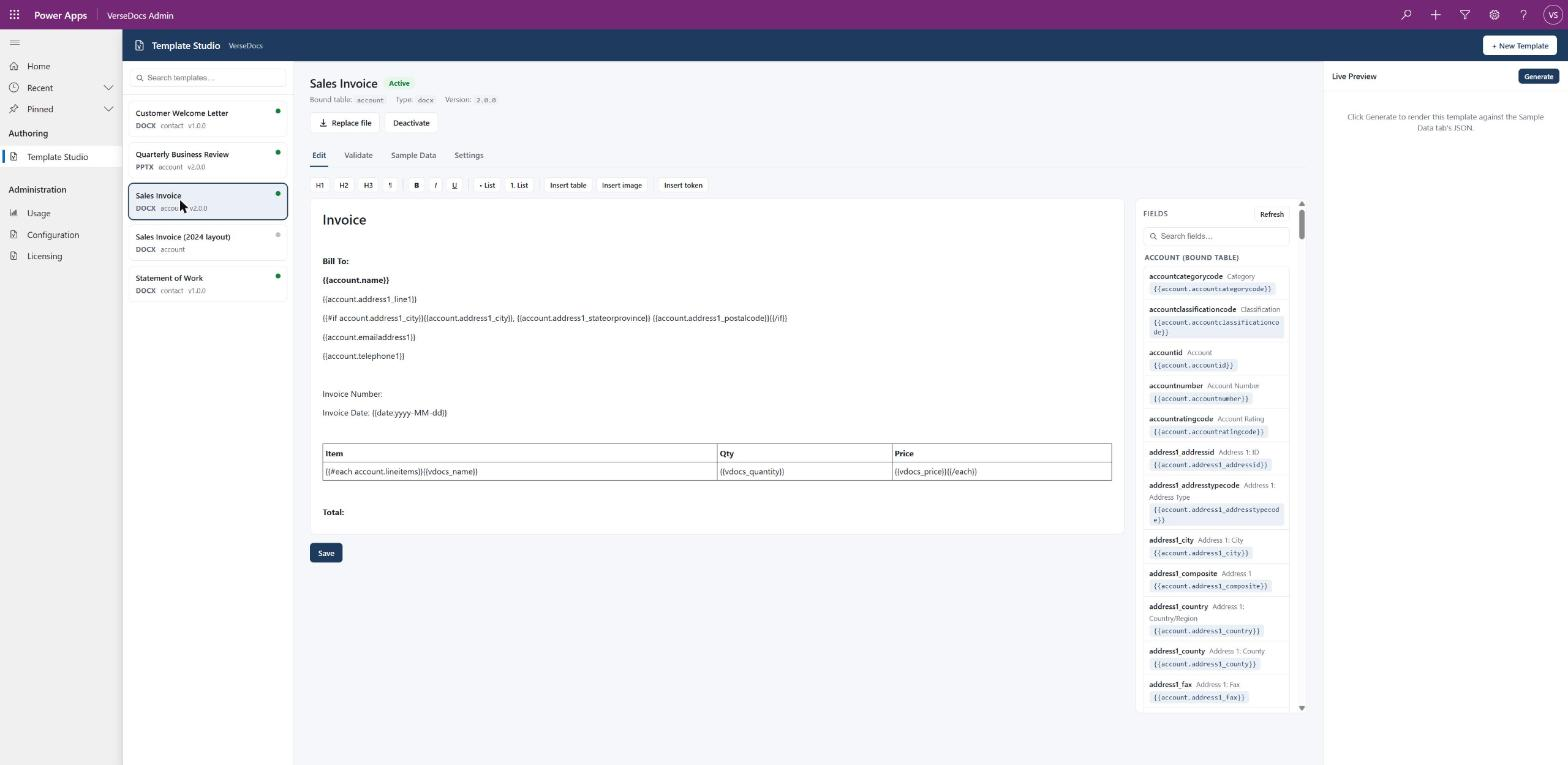
2. Formatters
{{total:N2}}                 1234.5    ->  1,234.50
{{invoiceDate:yyyy-MM-dd}}   a date    ->  2026-08-13
{{startTime:HH:mm:ss}}       a time    ->  09:30:00
Append :format to a field to format it. Formats are standard .NET format strings, applied using the culture you pass in Options.culture (for example "en-GB"); leave it unset for invariant culture.
Which rule applies is decided by the value’s own type, not by the format string:
| Value is a | Treated as | Notes |
|---|---|---|
| JSON number | Decimal | N2, F2, C2, 0.00 and friends. |
| JSON string | Date first, then number | Tried as a date/time under the active culture; if that fails, tried as a decimal — which covers numbers that arrived quoted. |
| Anything else | Error | A formatter on a boolean, array or object is TEMPLATE_INVALID_FORMAT. Formatters only make sense on scalars. |
Without a formatter, a value renders as its raw text: numbers keep exactly the digits the data had (so 30.00 stays 30.00, not 30), booleans render true/false, and null renders empty.
{{startTime:HH:mm:ss}} work exactly as written.3. Loops — Word
{{#each lines}}
  {{item}}: {{qty}} x {{price:N2}}
{{/each}}
Inside the block, the current context becomes each array element in turn, so bare tokens like {{item}} resolve against that element.
{{#each lines}}{{customer.name}}{{/each}} will not find the customer — everything a row needs must be on the row object itself.The target must be an array. Anything else is TEMPLATE_EACH_TARGET_NOT_ARRAY; a missing path is TEMPLATE_FIELD_MISSING unless onMissing is blank, in which case the block simply renders nothing.
Repeating a table row
The engine works out what to repeat from where you physically put the tags. You do not configure this:
| Where the tags are | What repeats |
|---|---|
| Both in cells of the same table row | That row, once per item. This is the classic invoice line-item pattern — {{#each lines}} in the first cell, {{/each}} in the last cell of the same row, fields in between. |
| In different rows of the same table | Every row from the opening tag's row to the closing tag's row inclusive — for a line item that needs more than one visual row. |
| Anywhere else | The paragraphs from the opening tag's paragraph through the closing tag's paragraph, inclusive. |
{{#each}} or after {{/each}} in it. Put loop tags in their own paragraph or their own table row unless you want the surrounding text repeated too.4. Conditionals — Word
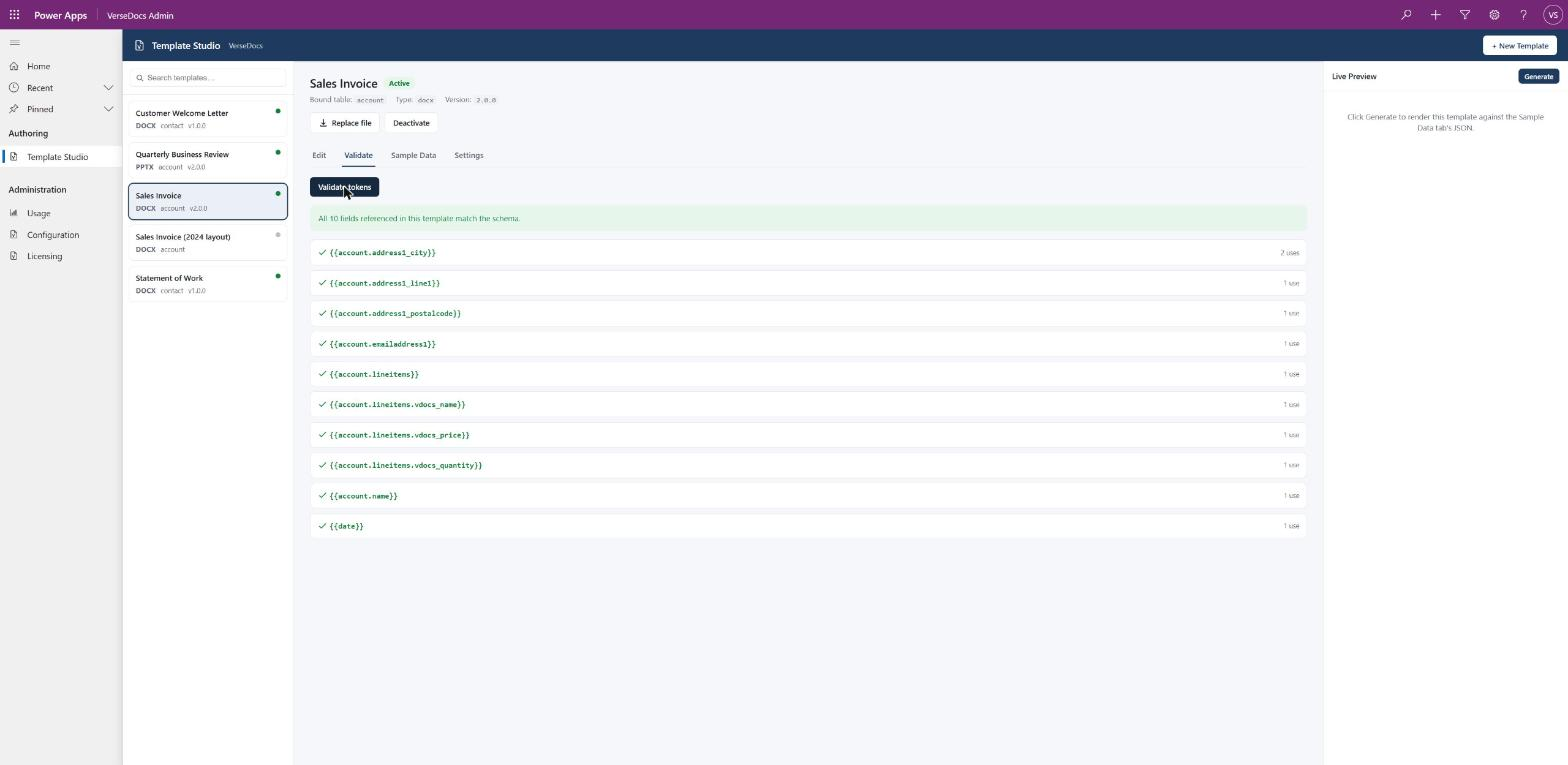
{{#if poNumber}}PO: {{poNumber}}{{/if}}
{{#unless poNumber}}No purchase order on file.{{/unless}}
{{#if}} keeps its content when the value is truthy; {{#unless}} keeps its content when it is falsy.
| Value | Truthy when |
|---|---|
| Boolean | It is true. |
| Number | It is non-zero. |
| String | It is non-empty. |
| Array | It has at least one element. |
| Object | Always — presence is the signal. |
null, or missing under blank | Never. |
TEMPLATE_FIELD_MISSING by default, exactly like a plain field. {{#if}} does not quietly treat “not in the data at all” as false — that would make it a silent typo-swallower. Only onMissing: blank makes it falsy.Which region gets kept or removed follows the same row / row-group / paragraph rules as loops above.
PO: {{#if po}}{{po}}{{/if}} (ref) a false po drops the value and leaves PO: and (ref) in place, because they sit outside the conditional. To drop a whole line, put its label inside: {{#if po}}PO: {{po}}{{/if}} — a conditional covering its entire paragraph removes the paragraph rather than leaving a blank line.4b. Totals and counts
A template can add up its own line items, so an invoice does not need its Subtotal, VAT and Total calculated somewhere else and stored on the record first.
{{#each lineitems}}{{name}}  {{qty}}  {{price}}
{{/each}}
Lines:    {{count:lineitems}}
Subtotal: {{sum:lineitems.price:N2}}
Cheapest: {{min:lineitems.price}}| Helper | Returns |
|---|---|
{{sum:rows.price}} | The total of that field across the collection. |
{{count:rows}} | How many items — no field, because counting needs none. |
{{avg:rows.price}} | The mean. |
{{min:rows.price}} | The smallest value. |
{{max:rows.price}} | The largest value. |
The last segment is the field, everything before it is the collection. So {{sum:account.lineitems.amount}} totals amount across account.lineitems. Formatters apply to the result: {{sum:lineitems.price:N2}}. Inside a loop, the path resolves against the current item, so {{sum:items.value}} within {{#each groups}} totals each group separately.
$1,800.00 rather than 1800 (section 7). Aggregates cope with that — the symbol and separators are stripped and the number recovered, with accounting parentheses read as negative. Blank, null and missing values count as zero. A value that genuinely is not a number fails with TEMPLATE_INVALID_FORMAT naming it, rather than being skipped: a total that quietly leaves out a line is worse than no total.{{rows.length}} is not supported — use {{count:rows}}.
Format money with :N2 and a literal symbol — Total: £{{sum:lineitems.price:N2}}. The :C formatter currently renders the generic currency sign ¤ rather than your own, because the render culture is invariant.
5. Images — Word
{{image:logo width=40mm}}
{{image:signature height=15mm}}
{{image:stamp width=25mm height=25mm}}
The name after image: is looked up in the images map you pass in the call’s options — a name to image-bytes map. PNG and JPEG are supported, and the format is detected from the bytes rather than from any file name.
| You give | You get |
|---|---|
| width only | Height computed from the image's own aspect ratio. |
| height only | Width computed from the image's own aspect ratio. |
| both | Both used exactly — aspect ratio is not preserved, because you asked for an exact box. |
| neither | TEMPLATE_SYNTAX_ERROR — a size is required. |
TEMPLATE_IMAGE_MISSING, even under onMissing: blank — there is no sensible “blank image”.vdocs_BarcodeGenerate, pass the returned image as a named image, and place {{image:barcode width=40mm}} in the template. Give a QR code only a width so it stays square.6. Built-in tokens
A few ambient values are merged in automatically, so a template can say “when was this generated” without anyone supplying it:
| Token | Meaning | Formattable |
|---|---|---|
date | Generation date, no time, in the calling user's own time zone. | Yes |
today | Identical to date, under a friendlier name. | Yes |
now | Generation date and time, in the calling user's own time zone. | Yes |
user.name | The calling user's display name, when resolvable. | No |
user.email | The calling user's email, when resolvable. | No |
{{date:yyyy-MM-dd}}   ->  2026-08-13
{{now:HH:mm}}         ->  14:23
{{user.name}} -> Alex Admin- Real data always wins. If your data already has a top-level field with one of these names, yours is used.
- Time zone. Dates are converted into the calling user’s own Dataverse time zone, using Dataverse’s own conversion, so daylight saving is handled correctly. In a flow, the “calling user” is the account the flow runs as — set that account’s time zone deliberately.
- Never a failure. If the time zone cannot be resolved for any reason, the value falls back to UTC and the document still renders. A time zone lookup will never be the reason a generation fails.
user.nameanduser.emailare best-effort. They are resolved on the row-bound path. When generating from JSON you supply, they are not resolved, and referencing them behaves like any other missing field.
7. Generating from a Dataverse row
When a document is generated from a record — the Generate document button, or the row-bound actions — the data is built for you from the template’s binding. Everything above still applies; this section describes the shape your tokens walk.
Formatted values and raw values
The row sits under its table’s logical name, and every column is reachable two ways:
{{account.statuscode}}        ->  Active      (formatted — what a user would see)
{{account._raw.statuscode}} -> 1 (raw — the underlying value)- Formatted (the default) is Dataverse’s own human-readable string:
Contoso Ltdrather than a GUID,Activerather than1,$1,234.00rather than1234. Where Dataverse has no formatted value — plain text and whole-number columns usually do not — it falls back to the raw value. _rawis the underlying value with its native type: a number for currency and option sets, a GUID string for a lookup, an array of codes for a multi-select. Use it when you want to apply your own formatter or branch on a code.
What each column type renders as
| Column type | Formatted (default) | _raw |
|---|---|---|
| Text | The text | Same |
| Option set | The label, e.g. Accounting | The code, e.g. 1 |
| Multi-select option set | All selected labels, semicolon-separated, e.g. Newsletter; Events | An array of codes, e.g. [676310001,676310003] |
| Currency | With a symbol, e.g. $125,000.50 | Plain decimal, e.g. 125000.5000 |
| Whole number | Dataverse supplies no formatted value, so this falls back to the raw number | Same integer |
| Two options (yes/no) | That column's own configured labels — not a generic Yes/No | true / false |
| Date and time | The calling user's own locale and time zone | ISO 8601 UTC |
| Lookup | The related record's display name, never a GUID | The related record's id |
Options.culture does not affect formatted currency. That string comes from Dataverse itself, computed from the organisation’s base currency and the calling user’s locale. If you need a specific culture regardless, format the raw value yourself: {{account._raw.revenue:N2}}.Do Not Allow and Allow. Check the column rather than assuming Yes/No.Related records
Every related table in the binding becomes an array under its alias, whatever the relationship type. Loop over it like any other array:
{{#each account.contacts}}
  {{fullname}} — {{jobtitle}}
  {{#each activities}}
    Task: {{subject}}
  {{/each}}
{{/each}}
This is uniform on purpose. A one-to-many relationship naturally holds many rows, and a lookup is also projected as an array — of zero or one element — rather than a bare object, so you use one pattern everywhere instead of learning a second shape per cardinality:
{{#each account.primarycontact}}Primary contact: {{fullname}}{{/each}}
{{account.primarycontact[0].fullname}}     equivalent, if you know there is exactly one
Nesting recurses to any depth, and many-to-many relationships need no special syntax.
Empty columns render empty
A real column with no value on this row renders as an empty string — including lookups, option sets, dates and booleans, and including when a formatter is attached, so {{contact.birthdate:yyyy-MM-dd}} on a contact with no birthdate renders empty rather than erroring or printing a nonsense default date.
A column that does not exist on the table at all still errors with TEMPLATE_FIELD_MISSING. That distinction is the point: an empty field is normal, a misspelled field is a bug, and they are not treated the same way.
8. Why tokens survive Word's editing
Word routinely stores what you typed as one token across several internal fragments — {{cus / tomer. / name}} — after a spellcheck pass, a copy-paste, or simply a second editing session. It is invisible in the UI and very real in the file.
VerseDocs handles this transparently: it reads each paragraph as one continuous string, finds tokens there, and writes the value into the first fragment the token touched, keeping that fragment’s formatting. Text and formatting outside the token are never disturbed. PowerPoint gets the identical treatment.
{{ began — so format the whole token consistently if you care how the result looks.9. Headers and footers
Tokens in headers and footers render exactly like tokens in the body — same engine, same rules. Footnotes and endnotes are not rendered.
10. Excel templates
Put {{path}} in any cell on any worksheet. Fields and formatters behave exactly as in sections 1 and 2.
- Formulas are never touched. A cell starting
=is left exactly as authored. - A cell containing only one plain token keeps its type. A cell whose entire content is
{{price}}— no surrounding text, no formatter — becomes a real Excel number, so formulas referencing it still compute. Any other shape produces a text cell.
Repeating rows: the rows named range
Excel’s equivalent of a Word line-item loop. Define a named range called exactly rows spanning one row (any number of columns), typically the line-item row under your headers. That row is duplicated once per element of the top-level rows array in your data.
- Bare tokens in the row resolve against that array element, exactly like a Word loop.
- Formulas shift correctly.
=B4*C4on the template row becomes=B5*C5on the next, just as if you had copied the row in Excel. - Styles and row height are preserved on every duplicated row.
- Zero items deletes the template row; one renders in place; N inserts N−1 rows below and shifts everything under them down — plan a totals row with that in mind.
- The
rowsname is removed from the output workbook, so recipients never see the authoring marker.
| Situation | Result |
|---|---|
Your rows data is not an array | TEMPLATE_EACH_TARGET_NOT_ARRAY |
Valid array, but the workbook has no rows named range | XLSX_ROWS_RANGE_MISSING |
The rows name spans more than one row, or is defined more than once | XLSX_INVALID_ROWS_RANGE |
Neither a rows range nor rows data | Not an error — a plain field-only workbook never touches this feature. |
11. PowerPoint templates
Fields, formatters, loops and conditionals all work in decks, using the same grammar and the same scoping rules as Word — plus one rule decks have and documents cannot.
Tokens work anywhere text goes: titles, body placeholders, any text box, and table cells, which need no special syntax. Slide content is rendered; slide masters and layouts are not.
Blocks inside one slide
{{#each}}, {{#if}} and {{#unless}} follow section 3’s rules exactly: tags in the same table row repeat that row, tags in different rows of one table repeat the row range, and anything else repeats the sibling range between the tags — paragraphs within one text box, or whole shapes when the tags sit in different shapes.
Repeating whole slides
Put {{#each products}} on one slide and {{/each}} on a later one, and every slide from the first through the last repeats, once per item — one slide per product, per region, per site. Each copy renders against its own item, so within-slide loops on those slides resolve per item too.
Slide 1:  Catalogue {{#each products}}
Slide 2:  Product: {{name}}      <- repeats per product
Slide 3:  End {{/each}}
{{#if}} and {{#unless}} spanning slides keep or drop the same range — how an appendix section gets included only when it applies.
- Zero items removes every slide in the range.
- Tags are stripped before any slide is copied, so no copy carries a leftover tag.
- Copies share the layout, images and hyperlinks they point at rather than duplicating them, and the deck's slide list is rewritten with fresh unique ids.
- A slide-spanning block nested inside another slide-spanning block is
UNSUPPORTED_FEATURE. Keep the inner block within one slide.
Images are not supported in decks
{{image:name}} raises UNSUPPORTED_FEATURE in a PowerPoint template. This one is structural rather than a choice: a PowerPoint picture is a shape in the slide’s shape tree, not something that lives inside a line of text the way a Word inline image does, so a token sitting in a paragraph carries no position to place a picture at.
12. Template error codes
| Code | Cause |
|---|---|
TEMPLATE_FIELD_MISSING | A token references a path that does not exist. The message names the exact path. |
TEMPLATE_INVALID_FORMAT | A formatter was applied to a value it cannot format — a boolean, array or object, or a string that is neither a date nor a number. |
TEMPLATE_EACH_TARGET_NOT_ARRAY | A {{#each}} target resolved to something that is not an array. |
TEMPLATE_IMAGE_MISSING | An image token names an image that was not supplied. |
TEMPLATE_SYNTAX_ERROR | A malformed token — most often an image token with no width or height. |
XLSX_ROWS_RANGE_MISSING | Row data was supplied but the workbook defines no rows range. |
XLSX_INVALID_ROWS_RANGE | The rows range spans more than one row, or is defined more than once. |
TEMPLATE_FIELD_MISSING that a typo would cause, at authoring time, with a suggested correction.