Semantic Search
Ask your crawled solutions a question in plain English. Results are ranked by meaning, not keywords. Search runs inside your Dataverse environment.
Where to Find It
Search is a section of Solution Manager, titled Search and labelled "Ask in plain English". The Component Dashboard search box is a plain text filter on name and summary, so it works differently.
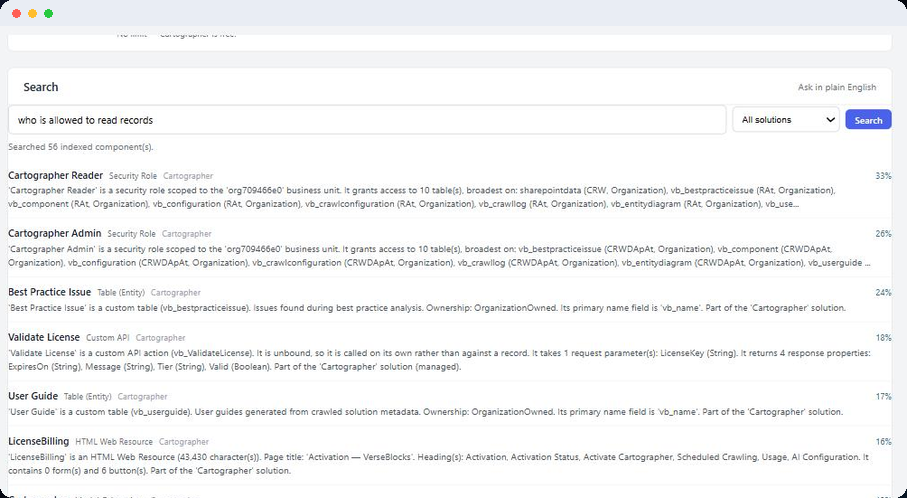
Asking a Question
- 1
Type your question
Write it the way you would ask a colleague, for example which flow emails customers when an order is late.
- 2
Choose a scope
The dropdown offers All solutions, or any one of the solutions you have added.
- 3
Click "Search" or press Enter
The ranked results appear under the box.
Two questions that worked
Both of these returned the expected component when tried on a crawled solution.
- "who is allowed to read records" returned the Cartographer Reader security role.
- "what runs by itself on a timer" returned the scheduled crawl flow.
What is searched
Each component's name and its summary. See Summaries for how summaries are written.
Reading the Results
Search shows the top 10 matches, ranked by meaning. Each result shows:
- Name. The component's name.
- Type. What kind of component it is.
- Solution. The solution that owns it.
- Percentage. How similar the component is to your question.
- Summary. The component's summary, clipped to 400 characters.
Under the list, a line reads "Searched N indexed component(s)." If the same component is tracked under two solutions, it appears once.
Results are text only. To see more about a component, find it by name in the Component Dashboard and open its detail panel.
Keeping Search Up to Date
Search only finds components that have been indexed. Indexing happens in your browser, from Solution Manager.
Crawl Now
After the crawl, the page indexes every component that has not been indexed yet, one at a time. The button shows a progress count while it works. Keep the page open until it finishes. Anything left unindexed is picked up by the next Crawl Now.
Rebuild search index
Found in the More actions menu on the solution's row. Recomputes the solution's search entries without crawling. Run it when a component's summary has changed, because a changed component keeps its earlier search entry until you do.
Rebuild everything
Also in the More actions menu. Re-reads every component, regenerates every summary, then re-indexes everything. Run it after upgrading Cartographer.
Each solution row shows where it stands, with one of three labels: "searchable", "N searchable" or "not searchable yet".
How It Works and What It Sends
Search uses a small open-source embedding model, all-MiniLM-L6-v2, released under the Apache License 2.0. It is about 22 MB and ships inside the Cartographer solution. It runs in the Dataverse plug-in sandbox of your own environment.
The model makes no network calls and writes no text. It turns each component's name and summary, and your question, into numbers, then compares them. Your questions and the results stay in your environment, and search sends no usage report. The privacy policy lists what Cartographer does send to VerseBlocks.
Limits
- English works best, because the model and the summaries are in English.
- Search can only find what a summary describes. It does not search source code, raw metadata or your records.
- It returns 10 results at most.
- There is no confidence threshold, so a weak match still shows up.